
Introducing Aduku Stacker

Infinite depth of field.
In one click.

Aduku Stacker merges your focus-bracketed shots into one sharp image, perfect for macro, product, and landscape photography.

Works on macOS 13+ · Free, and always will be — we believe essential tools should be accessible to everyone.
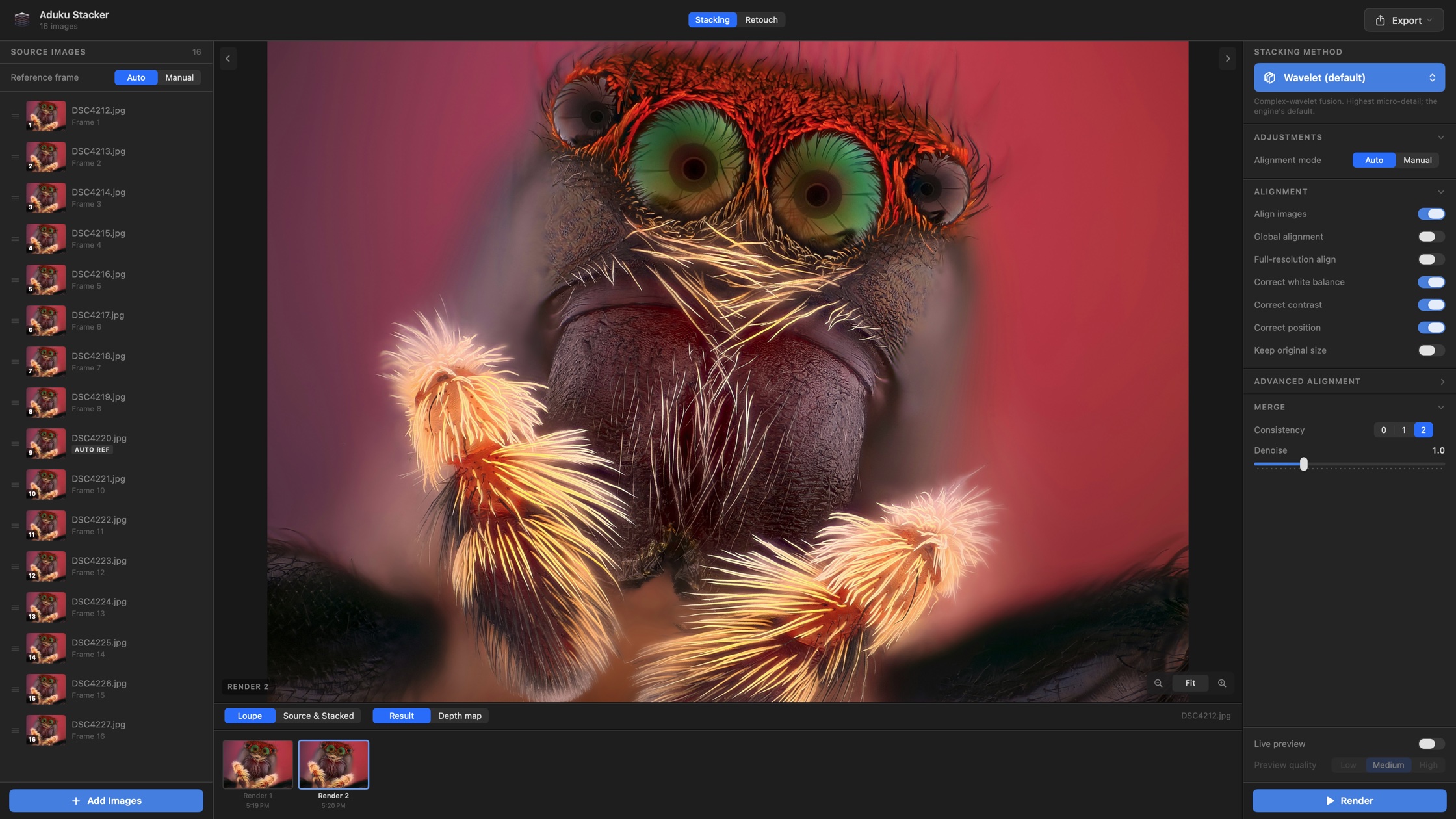
Aduku Stacker app showing a jumping spider focus stack with alignment and merge controls

FEATURES

Everything you need for perfect stacks

From alignment to final export, every step of the focus stacking workflow is automated, fast, and editable.

🧬

5 fusion engines

Wavelet, Pyramid, Weighted, Hybrid, and Depthmap merges — crisp, smooth, or confidence-masked blends of both.

🎚️

16-bit end-to-end

16-bit load, float-32 internal merge math, 16-bit output. No 8-bit shortcuts anywhere in the pipeline.

🎯

Surgical alignment

ORB / SIFT + RANSAC pre-align, ECC subpixel refinement, homography, focus-breathing fix, and 16×16 mesh warp.

Stack while you shoot

Coming soon

Streaming mode merges frames as they arrive, and memory-bounded batching keeps RAM flat at any stack depth.

🖌️

GPU retouching

Metal-accelerated copy-from-source brush, erase, and region-based undo. Paint detail in from any aligned frame.

📷

RAW in, DNG out

20+ RAW formats in. JPEG, PNG, TIFF, and linear DNG out at 8, 12 (packed), or 16-bit — plus depth maps.

UNDER THE HOOD

The whole engine, exposed

Every stage of the pipeline is toggleable and every parameter tunable — nothing is hidden behind presets.

Stacking engine

  • Wavelet, Pyramid, Weighted, Hybrid & Depthmap
  • Neighbor-voting outlier rejection
  • Tunable wavelet-shrinkage denoising
  • Halo-radius control & background removal
  • Color reassignment from source frames
  • Gaussian-fit depth maps with inpainting

Alignment pipeline

  • ORB / SIFT + RANSAC pre-alignment
  • ECC subpixel refinement, full-res pass
  • Full homography for sensor-tilt shots
  • Focus-breathing correction
  • 16×16 mesh warp for non-rigid shifts
  • Per-stage toggles & transform limits

Workflow & UI

  • Lightroom-style dark-mode interface
  • Filmstrip: drag-reorder, include / exclude
  • Live preview at three quality levels
  • Render history — revert & retouch last 10
  • Loupe & side-by-side compare, 1–16×
  • Real-time progress with verbose log

Performance & I/O

  • OpenCL GPU with CPU fallback
  • Memory-bounded incremental batching
  • Streaming — stack while still shooting
  • Aligned-frame TIFF cache for reuse
  • 20+ RAW formats, HEIC & native DNG
  • JPEG, PNG, TIFF & linear DNG 8/12/16-bit

COMPARISON

How Aduku Stacker compares

Benchmarked head-to-head against Helicon Focus 8 and Zerene Stacker — the long-standing industry standards for focus stacking.

Merge algorithms

Aduku Stacker

5 — Wavelet, Pyramid, Weighted, Hybrid, Depthmap

Helicon Focus 8

3 — weighted avg, depth map, pyramid

Zerene Stacker

2 — PMax (pyramid), DMap (depth map)

Bit depth

Aduku Stacker

16-bit end-to-end, float-32 internal math

Helicon Focus 8

8 / 16-bit

Zerene Stacker

16-bit TIFF in / out

RAW import

Aduku Stacker

20+ formats + native DNG

Helicon Focus 8

Native RAW decode in-app

Zerene Stacker

None — convert to TIFF/JPEG first

DNG output

Aduku Stacker

Linear DNG at 8 / 12 / 16-bit

Helicon Focus 8

Native color space DNG (Pro)

Zerene Stacker

TIFF / JPEG only

Alignment control

Aduku Stacker

Most tunable — ORB/SIFT + ECC, homography, breathing fix, mesh warp, limits

Helicon Focus 8

Auto shift / rotation / scale, few knobs

Zerene Stacker

Shift / rotation / scale; no perspective or mesh

Retouching

Aduku Stacker

Copy-from-source brush, erase, undo / redo (Metal GPU)

Helicon Focus 8

Clone, copy from sources and between outputs

Zerene Stacker

Paint from any source frame or stacked output

Stereo / animation

Aduku Stacker

Basic 3D preview

Helicon Focus 8

3D viewer, stereo pairs, anaglyph, video

Zerene Stacker

Synthetic stereo & rocking animations (Pro)

Deep-stack handling

Aduku Stacker

Memory-bounded batching — RAM stays flat at any depth

Helicon Focus 8

Large stacks supported

Zerene Stacker

Slabbing workflow for very deep stacks

GPU acceleration

Aduku Stacker

OpenCL + Metal retouching

Helicon Focus 8

OpenCL

Zerene Stacker

CPU-only (Java)

Live preview while tuning

Aduku Stacker

Debounced, 3 quality levels

Helicon Focus 8

Partial — re-renders per change

Zerene Stacker

Full re-render each time

Shoot-and-stack streaming

Aduku Stacker

Coming soon — stack frames while you shoot

Helicon Focus 8

Separate Helicon Remote app

Zerene Stacker

StackShot rail control only (Pro)

Platforms

Aduku Stacker

macOS 13+ (Apple Silicon)

Helicon Focus 8

Windows 10/11, macOS 12+

Zerene Stacker

Windows, macOS, Linux

Price

Aduku Stacker

Free

Helicon Focus 8

~$30–55 / yr or $115–240 lifetime

Zerene Stacker

$89–289 one-time

Ditch the tough stack blends, try Aduku.

Aduku Stacker — Terms of Service

Effective date: June 12, 2026

These Terms of Service ("Terms") govern your download, installation, and use of Aduku Stacker (the "Software"), a macOS application for focus stacking photographs, published by Suriyanarayanan R Srinivasan, Aduku labs. By downloading, installing, or using the Software, you agree to be bound by these Terms. If you do not agree, do not install or use the Software.

1. License Grant

Subject to these Terms, we grant you a personal, worldwide, non-exclusive, non-transferable, revocable license to install and use the Software on Apple Mac computers that you own or control, for personal or commercial photographic work.

Images you create with the Software are entirely yours. We claim no rights over your source photographs or your stacked, retouched, or exported results, and you may use them for any purpose, including commercial sale, without attribution.

2. Restrictions

You may not, except to the extent permitted by applicable law or by the open-source licenses identified in Section 5:

3. Privacy and Your Data

The Software processes your photographs entirely on your device. It does not upload your images, create user accounts, or transmit analytics or telemetry to us. Temporary working files (for example, RAW-conversion caches and aligned-frame caches) are stored locally on your Mac and may be cleared by you or by the operating system at any time. Because we collect no personal data through the Software, no separate privacy policy is required for its core operation; if this changes in a future version, these Terms and an accompanying privacy policy will be updated.

4. Third-Party Dependencies

Importing proprietary camera RAW formats (such as ARW, CR3, or NEF) uses Adobe DNG Converter, a separate application published by Adobe Inc. that you install and license directly from Adobe under Adobe's own terms. The Software does not include, distribute, or modify Adobe DNG Converter, and we are not responsible for its availability, behavior, or licensing. Without it, the Software still imports DNG, TIFF, PNG, HEIC, BMP, and JPEG files.

5. Open-Source Components

The Software incorporates open-source software, including:

These components are governed by their respective licenses, copies of which are included with the Software or available in the Acknowledgements section. Nothing in these Terms limits the rights granted to you by those licenses with respect to those components.

6. Updates and Availability

We may provide updates, bug fixes, or new features at our discretion. We are under no obligation to provide support, maintenance, or updates. We may modify or discontinue the Software at any time. Versions you have already installed will continue to function subject to operating-system compatibility.

7. Disclaimer of Warranty

THE SOFTWARE IS PROVIDED "AS IS" AND "AS AVAILABLE," WITHOUT WARRANTY OF ANY KIND, EXPRESS OR IMPLIED, INCLUDING BUT NOT LIMITED TO WARRANTIES OF MERCHANTABILITY, FITNESS FOR A PARTICULAR PURPOSE, ACCURACY, AND NON-INFRINGEMENT. WE DO NOT WARRANT THAT THE SOFTWARE WILL BE ERROR-FREE OR UNINTERRUPTED, OR THAT IT WILL MEET YOUR REQUIREMENTS. YOU ARE RESPONSIBLE FOR MAINTAINING BACKUP COPIES OF YOUR ORIGINAL PHOTOGRAPHS; WE ARE NOT LIABLE FOR LOSS OF OR DAMAGE TO IMAGE FILES.

8. Limitation of Liability

TO THE MAXIMUM EXTENT PERMITTED BY LAW, IN NO EVENT WILL WE BE LIABLE FOR ANY INDIRECT, INCIDENTAL, SPECIAL, CONSEQUENTIAL, OR PUNITIVE DAMAGES, OR FOR ANY LOSS OF DATA, PROFITS, OR BUSINESS, ARISING OUT OF OR RELATED TO YOUR USE OF OR INABILITY TO USE THE SOFTWARE, EVEN IF ADVISED OF THE POSSIBILITY OF SUCH DAMAGES. OUR TOTAL AGGREGATE LIABILITY FOR ALL CLAIMS RELATING TO THE SOFTWARE WILL NOT EXCEED THE AMOUNT YOU PAID FOR THE SOFTWARE OR FIFTY US DOLLARS (US $50), WHICHEVER IS GREATER. SOME JURISDICTIONS DO NOT ALLOW CERTAIN LIMITATIONS, SO PARTS OF THIS SECTION MAY NOT APPLY TO YOU.

9. Indemnification

You agree to indemnify and hold us harmless from claims, damages, and expenses (including reasonable legal fees) arising from your violation of these Terms or your misuse of the Software, including infringement of any third party's rights in images you process.

10. Termination

This license is effective until terminated. It terminates automatically if you breach these Terms. Upon termination, you must cease using the Software and delete all copies. Sections 3, 5, and 7–12 survive termination.

11. Changes to These Terms

We may revise these Terms from time to time. Material changes will be reflected by an updated "Last updated" date and, where practicable, an in-app or release-note notice. Continued use of the Software after changes take effect constitutes acceptance of the revised Terms.

12. Governing Law and General

These Terms are governed by the laws of India, without regard to conflict-of-law rules, and disputes are subject to the exclusive jurisdiction of the courts of Chennai, Tamil Nadu. If any provision is held unenforceable, the remainder stays in effect. These Terms are the entire agreement between you and us concerning the Software. Failure to enforce a provision is not a waiver.

13. Contact

Questions about these Terms: Suriyanarayanan.rs@gmail.com

Aduku Stacker is not affiliated with, endorsed by, or sponsored by Adobe Inc., HeliconSoft, or Zerene Systems LLC. All trademarks are the property of their respective owners.

Frequently Asked Questions

Everything about Aduku Stacker, from install to export

General

What is Aduku Stacker?
Aduku Stacker is a native macOS application for focus stacking: it combines a series of photographs taken at different focus distances into a single image that is sharp from front to back. It is built for macro, product, landscape, and microscopy photography.
What is focus stacking, and when do I need it?
At high magnification or close focusing distances, a single exposure cannot keep an entire subject in focus — depth of field may be a fraction of a millimeter. Focus stacking solves this: you shoot many frames stepping focus through the subject, and Aduku Stacker merges the sharp parts of each frame into one fully sharp result.
How much does Aduku Stacker cost?
Aduku Stacker is free.
Who makes Aduku Stacker?
Aduku Stacker is published by Aduku Labs. For questions or support, contact Suriyanarayanan.rs@gmail.com.

Installation & System Requirements

What are the system requirements?
A Mac with Apple Silicon (M1 or newer) running macOS 13 Ventura or later. 8 GB of RAM is sufficient for most stacks; 16 GB is recommended for deep 16-bit RAW stacks. No dedicated GPU is required.
Does it run on Intel Macs?
No. The current build is compiled for Apple Silicon (arm64) only.
How do I install it?
Open the DMG, drag Aduku Stacker into your Applications folder, and launch it. The app is self-contained — all processing libraries are bundled inside it.
Does Aduku Stacker need an internet connection?
No. All processing happens entirely on your Mac. The app has no accounts, no telemetry, and never uploads your images.

Importing Images

Which file formats can I import?
JPEG, PNG, TIFF, BMP, HEIC, and DNG work out of the box. With the free Adobe DNG Converter installed, Aduku Stacker also imports 20+ proprietary RAW formats, including Sony ARW, Canon CR2/CR3, Nikon NEF, Fujifilm RAF, Olympus ORF, Panasonic RW2, Pentax PEF, Leica RWL, Hasselblad 3FR, and Phase One IIQ.
Why do I need Adobe DNG Converter for RAW files?
Proprietary RAW formats are undocumented and change with every camera release. Aduku Stacker delegates that decoding step to Adobe's free, regularly updated DNG Converter, then processes the resulting DNG at full 16-bit depth. Download it free from Adobe's website; Aduku Stacker detects it automatically.
What happens if I import RAW files without Adobe DNG Converter installed?
The app falls back to macOS's built-in decoder where possible. Quality is usually still good, but installing DNG Converter guarantees the widest camera support and the most faithful 16-bit conversion.
How many images do I need in a stack?
Anywhere from 2 to many hundreds. Typical macro stacks run 20–100 frames. There is no hard limit — the engine processes images in batches, so memory use stays flat regardless of stack depth.
Do my photos need to be in order?
Frames are auto-sorted by filename, which matches how cameras number bracketed sequences. You can drag frames to reorder them manually. Front-to-back (or back-to-front) order matters most for the Depthmap method; the other methods are more forgiving.
Can I exclude a frame without deleting it?
Yes. Uncheck the frame's toggle in the filmstrip. It stays in the project but is skipped during rendering — handy for dropping a frame the subject moved in.

Stacking & Parameters

Which merge method should I use?
  • Wavelet (default): maximum fine detail — best for insects, bristles, and complex overlapping structures.
  • Pyramid: smooth results on well-ordered stacks.
  • Weighted: seam-free gentle blending; never produces hard edges.
  • Hybrid: wavelet sharpness where the focus winner is clear, smooth averaging where it isn't — good when Wavelet shows speckle.
  • Depthmap: cleanest result for clearly depth-ordered scenes such as product shots; also the basis for depth-map export.
When in doubt, start with Wavelet, and try Hybrid if you see noise-like artifacts.
Do I need to align my images first?
No. Aduku Stacker aligns automatically using feature matching plus subpixel refinement, correcting shift, rotation, scale, brightness, and white-balance drift between frames. Alignment runs before every merge unless you disable it.
My lens "breathes" (changes magnification while focusing). Can the app correct that?
Yes. Enable Breathing correction in Advanced Alignment — it estimates and removes the residual radial scaling that focus breathing causes.
The subject moved slightly between frames. What can I do?
Enable Mesh warp in Advanced Alignment, which applies a local grid-based warp to absorb small non-rigid movement. For anything larger, render anyway and paint the problem area from a single source frame using the Retouch tools.
What do the Consistency and Denoise sliders do?
Consistency (0–2) filters out isolated pixels that were selected from a different frame than their neighbors — higher values suppress speckle. Denoise applies wavelet-domain noise reduction during the merge; small values (around 1.0) reduce sensor noise without visibly softening detail. Both apply to the wavelet-family methods.
What is the depth map for?
The depth map encodes which frame — and therefore which distance — each pixel was sharpest in. You can view it in the preview, export it alongside the result, and use it in 3D tools or for creative depth-based edits.
Can I process images while still shooting?
The underlying engine supports streaming: it can begin aligning and merging while later frames are still arriving. In the app, you can start a render as soon as your import finishes; using the command-line engine, --wait-images enables true shoot-while-stacking workflows.

Preview & Performance

What is Live Preview?
A fast, downscaled render (Low 800 px / Medium 1400 px / High 2200 px) that updates automatically about 0.7 seconds after you change any parameter. Use it to tune settings interactively, then run a full-resolution render when you're happy.
How long does a render take?
It depends on stack depth, resolution, and method. The engine uses every CPU core plus GPU acceleration (OpenCL) for the wavelet transforms. As a rough guide, a 50-frame, 24-megapixel stack completes in a few minutes on an M-series Mac; live previews take seconds.
Does Aduku Stacker process in 16-bit?
Yes — 16-bit end to end by default. Files load at 16 bits, all merge mathematics run in 32-bit floating point internally, and results export at 16 bits (TIFF, PNG, DNG). This preserves highlight and shadow latitude for later editing.
Why is the rendered image slightly smaller than my originals?
Alignment shifts each frame slightly, leaving unreliable pixels at the borders, which are cropped by default. Enable Keep borders in export settings to retain the full original frame size instead.

Retouching

Can I fix artifacts without leaving the app?
Yes. Switch to the Retouch step. Choose any aligned source frame as a paint source, press B, and brush over the artifact to replace it with that frame's pixels — perfect for ghosted antennae, motion artifacts, or halo edges. E erases your strokes back to the original render, H pans, and ⌘Z / ⇧⌘Z undo and redo. Painting is GPU-accelerated and real-time.
Can I go back to an earlier render?
Yes. Aduku Stacker keeps your last 10 renders, each with its settings and aligned-frame cache. Click any entry in the render history to view, compare, retouch, or export it.
Is there a clone tool?
Not yet — cloning within the result is planned for an upcoming release. Today's tools cover copying from aligned source frames and erasing.

Exporting

Which export formats are supported?
JPEG (adjustable quality), PNG and TIFF (8- or 16-bit), and linear DNG at 8, 12, or 16 bits. You can also export the depth map alongside your result.
Why would I export DNG instead of TIFF?
A linear DNG behaves like a RAW file in Lightroom, Capture One, or Adobe Camera Raw: white balance, highlight recovery, and color grading remain flexible after stacking. Export DNG when you want to finish your raw development at the end of the workflow; export TIFF for direct retouching in Photoshop.
Who owns the images I create?
You do, entirely. Aduku Stacker claims no rights over your sources or results, and you can publish or sell them without attribution.

Troubleshooting

My result has halos around high-contrast edges. How do I fix them?
Increase the halo radius parameter, try the Hybrid method, or — for depth-ordered scenes — the Depthmap method with more Z smoothing. Stubborn halos can be painted out in Retouch using the source frame where that edge is sharp.
The result looks misaligned or ghosted. What should I try?
First check that no frame is wildly different (bumped tripod, changed framing) and exclude it. Then try: Use SIFT for low-contrast or low-texture subjects, Homography if the camera was slightly tilted, Full resolution alignment for fine subpixel accuracy, or transform limits in Manual mode if alignment is overcorrecting.
A render failed or produced a black image. What now?
Enable Verbose logging and re-run — the log panel shows exactly which stage failed and why. Common causes are mixed image sizes in one stack, corrupted source files, or running out of disk space for caches. If you're stuck, email the log to Suriyanarayanan.rs@gmail.com.
Where are temporary files stored, and can I delete them?
RAW conversions and aligned-frame caches live in temporary directories managed by the app (under /tmp). They are safe to delete at any time; the app recreates them when needed. Deleting caches only means the next render or retouch session re-computes alignment.
Is there a command-line version for batch processing?
Yes. The stacking engine ships as a command-line tool (focus-stack) that exposes every parameter as a flag — method, alignment options, consistency, denoise, depth-map tuning, threads, and more. It's ideal for scripting hundreds of stacks unattended.